
Recurring equipment inspections
Give technicians a consistent sequence for checking equipment condition, recording readings, and documenting abnormal findings across shifts or sites.

Make every recurring inspection clear, repeatable, and reviewable
Standardize recurring inspections, show field teams what must be checked, and collect the required evidence for review without replacing your work-order system.
Connect data, workflows, and field execution so teams can understand context, act faster, and keep work traceable.
Define what must be checked, the order of work, required fields, and the conditions that need an explanation or follow-up.
Give field teams a mobile workflow linked to the relevant location, equipment, or inspection round instead of relying on paper forms and memory.
Ask for photos, notes, readings, signatures, or exception reasons on the steps that need proof, creating a more complete record for review.
Prepare inspections for field use where network access is unreliable and synchronize completed records when the device reconnects.
Review completion status, abnormal findings, missing evidence, and submitted records so supervisors can focus on exceptions and follow-up.
Use FactVerse Data Fusion Services to exchange relevant asset, task, and operational context with existing systems when integration is required.
Practical applications and proven success scenarios across industries.
Give technicians a consistent sequence for checking equipment condition, recording readings, and documenting abnormal findings across shifts or sites.

Make required questions and evidence visible at the point of work, then retain a reviewable record for the customer's own safety or compliance process.
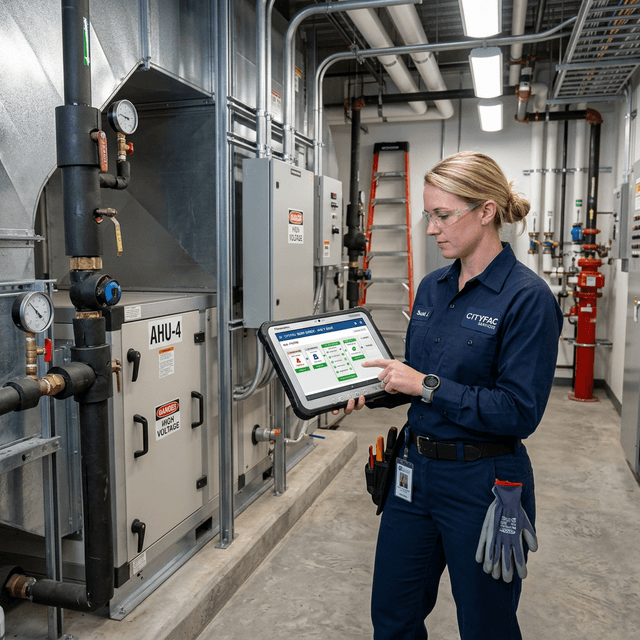
Confirm that required post-maintenance checks were completed and that photos, notes, readings, or sign-off were captured before the task moves forward.

Use a repeatable checklist to verify installation or commissioning items, record exceptions, and organize evidence for customer review.

Reuse an approved inspection template across selected sites while keeping a visible record of completion and exceptions for each location.
Recurring checks often look simple until they span multiple shifts, contractors, or sites. Paper forms go missing, required photos are skipped, abnormal findings are described differently, and supervisors cannot see what remains incomplete without chasing people for updates.
Checklist gives process owners a focused way to define required checks and gives field teams a clear mobile sequence for completing them. Each inspection follows a repeatable process and produces a reviewable record of what happened.
An inspection owner can define required steps, fields, readings, photos, notes, signatures, and exception reasons. Field teams see the relevant checklist near the equipment or location, complete each required item, and submit a consistent record for review.
Where connectivity is limited, the workflow can be prepared for field use and synchronized after reconnection. Exact offline behavior, devices, and deployment requirements should be confirmed against the current product release during pilot planning.
Submitted checks show completion, abnormal findings, missing evidence, and supporting records. Supervisors can review exceptions and decide what follow-up is required under the customer's operating process.
Checklist organizes the inspection record used in that decision. The customer manages qualified inspection and safety roles, standards, approval authority, retention policy, compliance certification, equipment release, and regulatory judgment.
This boundary lets a customer start with a focused inspection program while keeping existing maintenance systems and Inspector in their defined roles.
Public DataMesh references show adjacent operational needs: Swire Coca-Cola addresses maintenance-process and frontline-training digitization, Foxconn addresses training and equipment-maintenance workflows, and Yokogawa addresses AI-assisted predictive maintenance. They demonstrate the value of clearer field execution and operational evidence. A Checklist evaluation uses the customer's selected inspection, users, evidence requirements, and existing systems as its direct basis.
The project team agrees baseline measures and reviews completion quality, evidence coverage, handoffs, and exceptions in the selected workflow before expanding scope.
Choose a recurring inspection with an accountable owner, a stable standard, known evidence gaps, and a manageable user group. Define what must be completed, what proof is required, who reviews exceptions, and which existing systems need data exchange.
During the pilot, measure completion visibility, missing evidence, review effort, field usability, offline behavior, and follow-up handling. Use those findings to decide whether to expand Checklist, connect it to more systems, or adopt Inspector for a broader closed-loop operational workflow.
Checklist helps when recurring inspections depend on paper, spreadsheets, or individual memory. It gives teams a shared sequence, makes required evidence explicit, and gives supervisors a clearer record of completion and exceptions.
Checklist is the focused experience for repeatable inspections and their evidence. Inspector owns the broader operational lifecycle, including alarms, work-order creation and assignment, execution, review, acceptance, and closure. A customer may use Checklist for a narrow inspection program or Inspector when the full closed-loop workflow is required.
Director owns reusable guided procedures and 3D training content. Checklist owns the inspection form, required checks, and submitted evidence. FactVerse Data Fusion Services connects relevant data and systems when the workflow needs external asset, task, or operational context.
Checklist helps standardize execution and preserve records. The customer defines inspection standards, qualified personnel, review, certification, and regulatory decisions. Results are assessed against checklist design, adoption, data quality, and operating practice.
Start with one recurring inspection that has a named owner, clear completion criteria, and known evidence gaps. Validate field usability, offline behavior, record completeness, supervisor review, and any required system integration before expanding to more sites or processes.
Continue with the most relevant products, solutions, guides, and public references for this topic.